


I've too tired today to hack and therefore decided to blog a bit. I'm sitting at the Budapest airport waiting for my flight to Dublin which should be my last flight for the next week. And that week I hope to spend in Dublin without any traveling.
Ok, ok. I do like traveling, I like flying but after going from Mykolayiv to Kyiv (500km) to apply to Irish visa, going back home, going to Kyiv again to catch the flight to London, going back from London to Kyiv, then traveling Ukraine with the usual "give me my visa" route again (Kyiv-Mykolayiv-Kyiv-Mykolayiv) I feel like a bit tired ;) I've already covered 6x500=3000 km of Ukrainian territory and I observed each kilometer from the window in the bus! Yeah, yeah, you don't travel Ukraine by plane - it's extremely expensive.
But all that had positive result - I have my visa and I'm already heading Dublin for aKademy! By the way I also visited the RailsConf Europe in London which should really be the topic of my next blog.
22 September 2006

04 September 2006
The case of Ideal UI mode
In Qt 4.2 trolls did amazing job at improving dockwidgets. They even added the tabbing feature so that you can group docks into the one tabwidget by just dragging one on top of another.
A couple of months ago I thought that would replace "Ideal buttonbars" - those groups of buttons you can see in KDevelop and Quanta in Ideal UI mode at the window borders. But today I think that buttons should still stay if we want the Ideal mode like we had before. We just don't have enough control of those new tabs and can't make them do what we want (i.e. hide toolviews). Also they seem to be always horizontal which is a pity because we got used to vertical rows of buttons.
So, this and this is how KDevelop4 with toolviews looks now. Notice that KDevelop4 looks exactly like Qt Designer - all toolviews are just plain dock widgets. And this is how Ideal mode looked before. Notice the "button bars" at the bottom, left and right window sides.
The question now is Qt Designer-like interface good enough or is it better to back to good old Ideal UI with buttonbars? I don't have the good answer, please share your opinion with us at kdevelop-devel@kdevelop.org or just leave a comment here.
For now I'll continue working on new Ideal library. I miss Ideal too much ;)
A couple of months ago I thought that would replace "Ideal buttonbars" - those groups of buttons you can see in KDevelop and Quanta in Ideal UI mode at the window borders. But today I think that buttons should still stay if we want the Ideal mode like we had before. We just don't have enough control of those new tabs and can't make them do what we want (i.e. hide toolviews). Also they seem to be always horizontal which is a pity because we got used to vertical rows of buttons.
So, this and this is how KDevelop4 with toolviews looks now. Notice that KDevelop4 looks exactly like Qt Designer - all toolviews are just plain dock widgets. And this is how Ideal mode looked before. Notice the "button bars" at the bottom, left and right window sides.
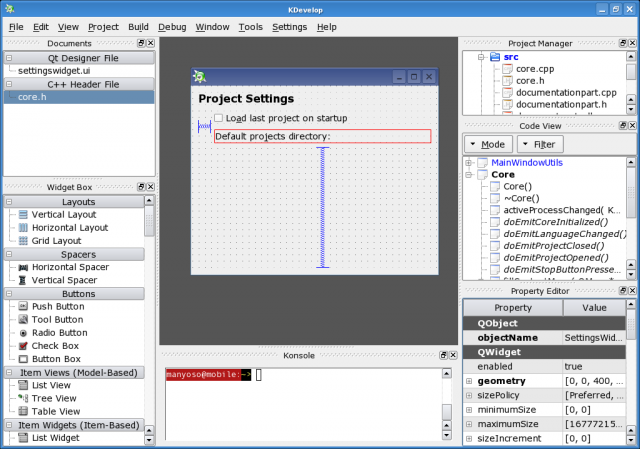


The question now is Qt Designer-like interface good enough or is it better to back to good old Ideal UI with buttonbars? I don't have the good answer, please share your opinion with us at kdevelop-devel@kdevelop.org or just leave a comment here.
For now I'll continue working on new Ideal library. I miss Ideal too much ;)
It's good to be back
Yes, I'm back after not committing for a month and I'm back with the new ruby parser for KDevelop. The parser is of course not finished and it barely parses simple ruby code but it is there. I'm looking forward to implementing some real ruby language support features. First will most likely be a code model (which will automatically give nice code view with classes, methods, etc.). As it turned out our kdevelop-pg parser generator framework makes it dead easy to do that. And its not only the kdevelop-pg that helps, the whole KDevelop4 architecture makes the process a lot faster.
Previously when you wanted to implement the language support in KDevelop, you should have done:
Today you still have to write the lexer and the parser, but you no longer have to care much about the AST and AST walkers(visitors) because they are generated for you. And once the code model definition file is written, the entire code model will be generated too. kdevelop-pg does all those things.
From the other side, KDevelop4 has more generic language support and abstracted background parser so you can just tell the language support in several lines of code to use your parser. There's no need for language support code duplication which was so common in KDevelop3.
Simply put, points #3 and #5 are automatic now, #2, #4 and #6 were made easier. At this point I'm wondering if it is feasible to eliminate the #4 completely, i.e. implement automatic generation of code model binder which traverses the AST and fills the codemodel with items.
From what I can see KDevelop4 will really shine in the area of language supports. blackarrow is doing wonders with C++. jpetso completed his summer-of-code csharp project and the excellent csharp support is already in SVN. manyoso added java support that uses the complete java parser jpetso created last year. And if we add up language-neutral refactoring (which was another SOC project) to the stack, we would get the idea of how cool KDevelop4 is going to be!
It doesn't look like I'm short of cool material for my aKademy presentation :) Rock on, KDevelop!
Previously when you wanted to implement the language support in KDevelop, you should have done:
- lexer to tokenize the source
- parser to transform the token stream into the AST
- AST walker to make it possible to do something with it
- AST parser to create the abstract code representation - the code model
- "background parser" to execute the parser as a background job and fill the code model
- language support part to run the background parser
Today you still have to write the lexer and the parser, but you no longer have to care much about the AST and AST walkers(visitors) because they are generated for you. And once the code model definition file is written, the entire code model will be generated too. kdevelop-pg does all those things.
From the other side, KDevelop4 has more generic language support and abstracted background parser so you can just tell the language support in several lines of code to use your parser. There's no need for language support code duplication which was so common in KDevelop3.
Simply put, points #3 and #5 are automatic now, #2, #4 and #6 were made easier. At this point I'm wondering if it is feasible to eliminate the #4 completely, i.e. implement automatic generation of code model binder which traverses the AST and fills the codemodel with items.
From what I can see KDevelop4 will really shine in the area of language supports. blackarrow is doing wonders with C++. jpetso completed his summer-of-code csharp project and the excellent csharp support is already in SVN. manyoso added java support that uses the complete java parser jpetso created last year. And if we add up language-neutral refactoring (which was another SOC project) to the stack, we would get the idea of how cool KDevelop4 is going to be!
It doesn't look like I'm short of cool material for my aKademy presentation :) Rock on, KDevelop!
Subscribe to:
Posts (Atom)